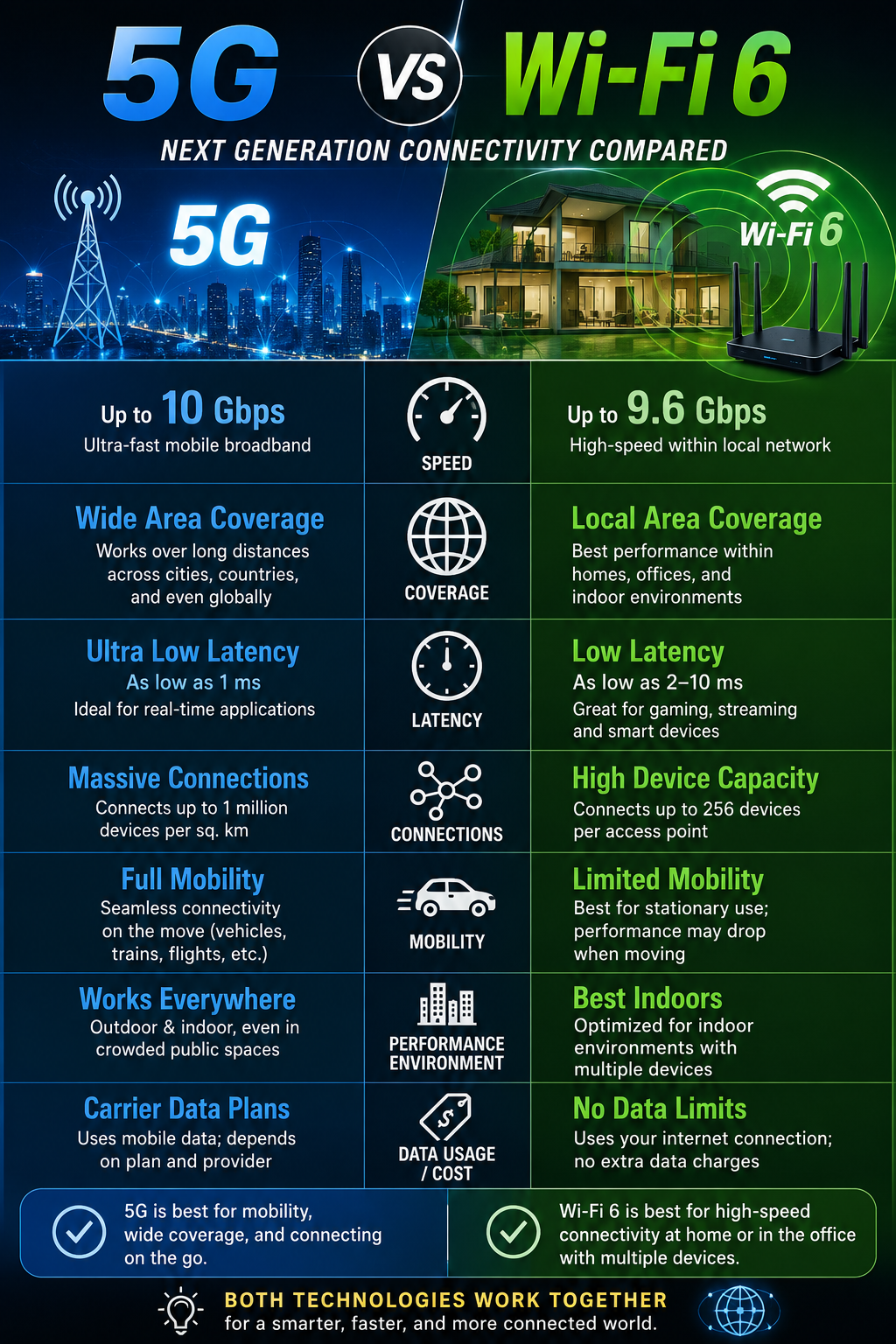
5G vs. Wi-Fi 6: Which is Better for Your Home Network?
The battle between 5G and Wi-Fi 6 isn’t just about mobile versus home internet—it’s about speed, reliability, efficiency, and future-proofing your network. As both technologies continue to evolve, homeowners and renters are increasingly asking the same question:
Which is better for my home network?
In this guide, we’ll compare 5G and Wi-Fi 6, explore their strengths and weaknesses, and help you determine which solution best suits your needs.
1. Introduction: Understanding 5G and Wi-Fi 6
Before comparing the two technologies, it's important to understand what each one offers.
What is 5G?
5G (Fifth-Generation Wireless Technology) is the latest cellular network standard designed to deliver:
- Ultra-fast internet speeds
- Low latency
- Massive device connectivity
- Improved network efficiency
Unlike Wi-Fi, 5G is delivered through cell towers operated by telecom providers and uses licensed radio spectrum.
What is Wi-Fi 6?
Wi-Fi 6 (802.11ax) is the latest generation of Wi-Fi technology designed for local wireless networking. It offers:
- Faster wireless speeds
- Better performance in crowded environments
- Improved battery efficiency for devices
- Enhanced support for smart homes
Wi-Fi 6 operates through a router within your home and uses unlicensed spectrum bands such as 2.4GHz, 5GHz, and 6GHz (Wi-Fi 6E).
2. Key Differences Between 5G and Wi-Fi 6
The following comparison highlights the major differences between the two technologies.
|
Feature |
5G |
Wi-Fi 6 |
|
Maximum Theoretical Speed |
Up to 10 Gbps |
Up to 9.6 Gbps |
|
Typical Real-World Speed |
50 Mbps – 1 Gbps |
500 Mbps – 2 Gbps |
|
Latency |
10–50 ms |
1–10 ms |
|
Coverage |
Wide-area network |
Local-area network |
|
Reliability |
Depends on tower availability |
Depends on router quality |
|
Deployment |
Requires cellular infrastructure |
Requires a Wi-Fi 6 router |
|
Cost |
Monthly subscription |
Router purchase + ISP plan |
Speed & Latency
Both technologies are incredibly fast compared to older generations.
5G Advantages
- Supports gigabit-level mobile internet
- Excellent for downloading large files
- Suitable for streaming and cloud applications
Wi-Fi 6 Advantages
- Lower latency for gaming
- More consistent speeds within the home
- Better performance for local network traffic
Winner: Wi-Fi 6
For most home users, Wi-Fi 6 delivers more stable speeds and lower latency than 5G.
Coverage & Reliability
Coverage is one of the biggest differences between the two technologies.
5G Coverage
5G provides internet access over large geographic areas through nearby cell towers. However, signal quality can be affected by:
- Distance from towers
- Buildings
- Weather conditions
- Network congestion
Wi-Fi 6 Coverage
Wi-Fi 6 coverage depends on:
- Router placement
- Home layout
- Wall materials
- Interference from nearby networks
Mesh Wi-Fi systems can significantly improve Wi-Fi coverage throughout large homes.
Winner: Depends on Your Situation
- Wi-Fi 6 wins for indoor stability.
- 5G wins for broader geographical coverage.
Deployment & Infrastructure
5G Requirements
To use 5G effectively, you need:
- A 5G-compatible modem or device
- Strong carrier coverage
- A suitable mobile or home internet plan
Wi-Fi 6 Requirements
To use Wi-Fi 6, you need:
- A Wi-Fi 6 router
- Compatible devices
- An active broadband internet connection
Winner: Wi-Fi 6
Wi-Fi 6 is easier and more accessible for most households.
Cost & Accessibility
5G Costs
Typical 5G home internet plans range from:
- $50–$100 per month
Potential concerns include:
- Data limits
- Network throttling
- Variable speeds
Wi-Fi 6 Costs
Typical costs include:
- Wi-Fi 6 router: $100–$300
- Monthly broadband subscription
Although there is an upfront hardware cost, Wi-Fi 6 often provides better long-term value.
Winner: Wi-Fi 6
Most households will find Wi-Fi 6 more cost-effective over time.
3. When to Use 5G for Your Home Network
5G can be an excellent alternative to traditional broadband in specific situations.
Best Use Cases for 5G
Rural Areas
If fiber or cable internet isn't available, 5G can provide fast and reliable connectivity.
Temporary Living Arrangements
Ideal for:
- Renters
- Students
- Travelers
- Remote workers
Backup Internet Connection
A 5G modem can serve as a failover connection if your primary ISP experiences downtime.
Quick Deployment
Unlike fiber installations, 5G internet can often be activated within minutes.
Limitations of 5G
- Data caps may apply
- Signal quality can vary
- Network congestion may affect speeds
- Performance depends heavily on carrier infrastructure
4. When to Use Wi-Fi 6 for Your Home Network
Wi-Fi 6 remains the preferred choice for most households.
Best Use Cases for Wi-Fi 6
Smart Homes
Supports dozens of connected devices simultaneously, including:
- Smart TVs
- Security cameras
- Smart speakers
- Smart appliances
Gaming and Streaming
Perfect for:
- Online gaming
- 4K streaming
- 8K streaming
- Virtual reality applications
High-Density Households
Wi-Fi 6 handles multiple users better than previous Wi-Fi generations.
Future-Proof Networking
Wi-Fi 6 and Wi-Fi 6E are designed to support growing bandwidth demands.
Limitations of Wi-Fi 6
- Coverage decreases with distance
- Walls can weaken signals
- Requires compatible devices for maximum performance
5. Can 5G and Wi-Fi 6 Work Together?
Absolutely.
In fact, many modern networking setups combine both technologies.
Hybrid Network Setup
Primary Network
Use Wi-Fi 6 for:
- Smart TVs
- Computers
- Gaming consoles
- Smart home devices
Secondary Network
Use 5G for:
- Backup internet access
- Mobile devices
- Outdoor connectivity
Future Trends
Emerging technologies are making both systems even more powerful:
- Wi-Fi 6E
- Wi-Fi 7
- 5G Standalone (SA)
- Fixed Wireless Access (FWA)
These developments will further blur the line between home and mobile networking.
6. Final Verdict: Which Should You Choose?
The answer depends on your specific needs.
|
Scenario |
Recommended Choice |
|
Home with Fiber or Cable Internet |
Wi-Fi 6 |
|
Smart Home with Many Devices |
Wi-Fi 6 |
|
Online Gaming |
Wi-Fi 6 |
|
4K/8K Streaming |
Wi-Fi 6 |
|
Rural Area Without Broadband |
5G Home Internet |
|
Temporary Setup |
5G |
|
Backup Internet Connection |
5G |
|
Hybrid Home Network |
Both |
Final Recommendation
For most households, Wi-Fi 6 is the better choice because it offers lower latency, more reliable indoor performance, and superior support for multiple devices.
However, 5G Home Internet is an excellent alternative where traditional broadband options are unavailable or unreliable.
The best solution may be to combine both technologies—using Wi-Fi 6 as your primary network and 5G as a backup connection. This approach provides the speed, flexibility, and reliability needed for today's connected homes.
Bottom Line
Choose Wi-Fi 6 if you want the best overall home networking experience.
Choose 5G if you need flexibility, mobility, or an alternative to traditional broadband

Ask about this topic